The Interface Is Dead (Long Live the Work Surface)
I drew a whiteboard diagram last month that made me question whether interface design was still a job. Here's what I saw.

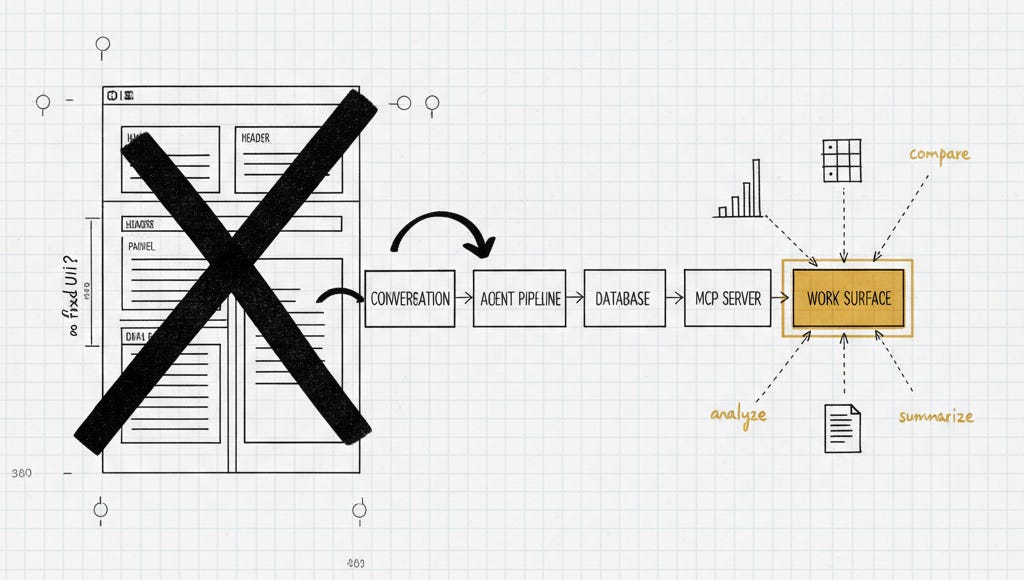
I’ve been thinking about interface design for twenty years. Last month, I drew a diagram on a whiteboard that made me question whether that was still a job.
Not in an “AI is taking everything” way. In a more specific, structural way — the kind that only makes sense once you’ve seen it, and then you can’t unsee it.
I was sketching the system diagram for a proof of concept — mapping the data flow from conversation to an agentic pipeline, to a database, to an MCP server, to…
And somewhere in the middle of drawing that last box — the one representing where the user actually works — I stopped.
I didn’t need an interface.
I mean, I was planning to design one. I would have been thinking through user flows, building screens, debating layouts, nudging pixels. But sitting there looking at the diagram, I realized that once the data reaches the work surface, all of that is optional. The user can just ask for what they want. However they want to see it.
And I don’t think most people building enterprise apps have registered it yet.
The Assumption That’s Breaking
For thirty years, interface design has been built on a quiet assumption: we know what the user needs to see, and our job is to build it for them.
It’s a good assumption. It gave us the GUI, it gave us mobile-first design, it gave us the entire discipline of UX research — the idea that if you understand your user deeply enough, you can design the perfect path through information.
Nielsen Norman Group recently named the current moment one of only three major interface paradigm shifts in computing history. The first was batch processing. The second was command-based interaction — sixty years spanning terminals, CLIs, and eventually GUIs. The third is what’s happening now: AI systems that reverse the locus of control entirely. Users don’t tell the computer how to do something anymore. They tell it what they want.
That framing gives this moment historical weight without overstating it. The GUI didn’t arrive all at once. It took years to become dominant. But at some point, the direction became obvious.
We’re at that inflection point now.
The Signals Are Already in Your Building
Here’s what I’ve been watching.
The executives in my organization are spinning up HTML files to present ideas. Not hiring a designer. Not submitting a creative request and waiting a month. They’re just doing it. They describe what they want, it exists. Before, that was a month-long project with a loaned designer from another team. Now it’s an afternoon. That’s not a productivity improvement — it’s a different model of how information gets made visual.
OpenAI ran an “Intelligence at Work” event this week. One number in the announcements deserves more attention than it got: knowledge workers now represent 20% of Codex’s weekly active users — and they’re growing three times faster than developers. The fastest-growing tasks: data analysis up 110% week-over-week, research up 37%, knowledge artifacts — reports, presentations, memos — up 36%.
Anthropic took Claude Cowork out of preview in April and pushed it to all paid plans. They built it after watching non-technical teams bypass the chat interface and work directly in Claude Code to get things done. Microsoft’s Copilot Workspace went generally available at Build this week. SpaceX secured a $60 billion option to acquire Cursor, with both companies working together to build “the world’s best coding and knowledge work AI.”
All of this in the last ninety days.
This isn’t a trend to watch. It’s a product category forming in real time — one that makes the traditional designed interface optional.
What a Work Surface Actually Is
Let me be specific, because there’s a lot of noise in this space.
Claude Cowork and OpenAI Codex are work surfaces. Not IDEs, not chat interfaces — surfaces. They take the raw power of coding agents and bring it into environments where knowledge workers operate. They connect to your data via MCP (the protocol that lets AI agents plug into external systems), they run multi-step processes, and they generate whatever display the user asks for.
In the innovation app we’re building, an idea goes through ten stages of processing. When the user wants to see how their idea stacks up against competitors, they ask for a comparison table. The work surface generates it. They want to see potential market value? They describe how they want it displayed, and it appears. The table’s missing a competitor? They say so — it updates. The chart doesn’t show the regional breakdown they care about? They redirect — it regenerates.
The interface isn’t fixed. It resolves from the data and the user’s intent.
I’ve done this with output from other teams too — taken HTML files they gave me and regenerated the interface to the same data in a completely different way, because what I needed to understand wasn’t what they needed to present. The display was malleable. The information was stable.
This is what designers have been trying to build for thirty years. Adaptive interfaces. Personalized to the individual. Responsive to context. The holy grail of UX — always theoretically possible, always practically impossible, because building it explicitly for every user state at every permutation was impossibly expensive.
AI didn’t move the goalposts closer. It changed the game entirely.
What Design Becomes
There’s a practical reason this matters beyond the obvious efficiency gains. A colleague in engineering ops put it plainly: the cognitive cost of transitioning between projects isn’t being accounted for in resource planning — nobody measures it, but it compounds. The work surface changes that equation. The information moves to you rather than requiring you to navigate to it.
Which brings the obvious question: does this mean designers are finished?
No. But the craft changes in ways the design community hasn’t started thinking about yet.
Nielsen Norman Group put it directly in their work on generative UI: “We’ll need to shift from designing interfaces to designing outcomes. Humans will need to provide guidance and constraints for generative UI.”
The pixel-nudging goes away. What replaces it is higher-order thinking that this craft was always building toward — if the mental model shifts.
Instead of “what should this screen look like,” the question becomes “what should information look like when a user is in a comparative analysis intent state?” You define what that mode delivers: what it must show, what it should show, what it never shows. You define the logic, not the layout. You think in intent states and visual models, not components and flows.
The design system doesn’t disappear — it loosens into something more like a skills library. Think `SKILL.md` files that define how a comparative analysis intent should display, what a financial summary module must include, which patterns are anti-patterns for research output. Code snippets for distinct display modules. JSON that encodes the brand constraints and hierarchy rules. The agent reads those files, interprets them, and renders accordingly. You’re not arranging pixels — you’re authoring the rules the surface follows.
For engineering and product leaders, the implication runs upstream of the design org: the roadmaps you’re setting and the products you’re shipping were designed for a world where the interface is fixed. That world has a shorter runway than most roadmaps assume.
Where to Skate
I showed a colleague the diagram from that meeting. He works in these tools every day — Cowork, Codex, all of it. His mind was blown. Not because the technology was new to him, but because he’d never assembled the signals into this picture.
That’s where most of the design, product, and engineering community is right now. The tools are in the building. The behavior is happening. The product category launched simultaneously from three major companies in the same week.
The question isn’t whether this shift is coming. It’s whether you’re thinking about where the puck is going.
Stop designing for the interface that exists. Start defining intent states. Map what information looks like in comparative analysis mode, financial analysis mode, research synthesis mode. Build the skills library — the `SKILL.md` files, the display rules, the encoded brand constraints — that an agent can interpret and apply. Think in intention and anti-pattern, not layout and flow.
The pixels aren’t going anywhere. But the job isn’t placing them anymore. The job is defining what the information should mean — and letting the surface figure out how to show it.